












Moxa NPort 5110 1-Port Serial Device Server


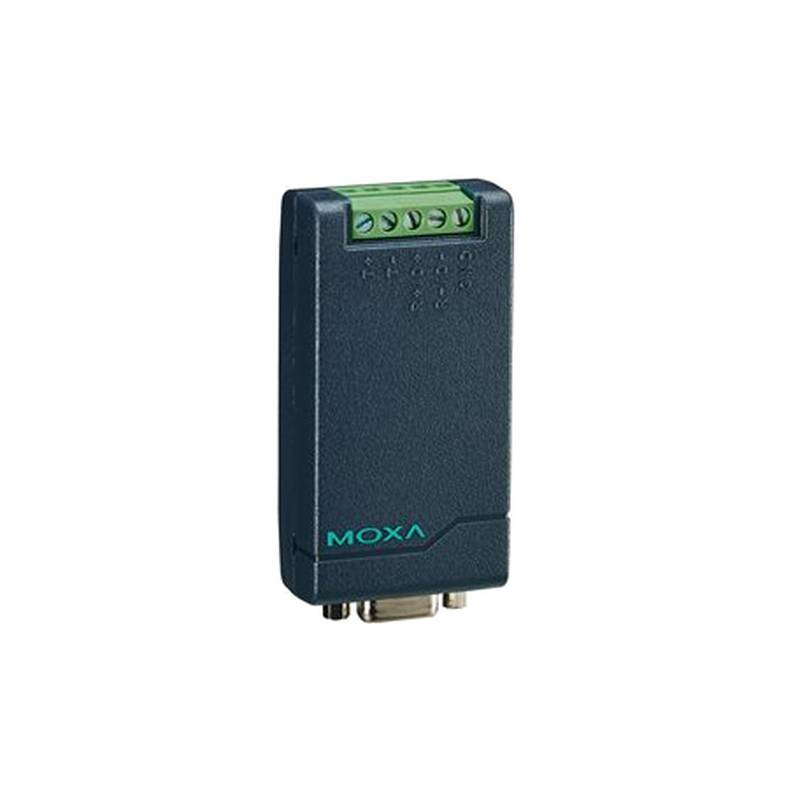
The Moxa NPort 5110 1-Port Serial Device Server is a compact and robust solution designed to bring legacy serial devices into the modern TCP/IP network environment. This industrial-grade device server excels in extending serial connectivity over Ethernet, offering a reliable bridge for applications requiring remote device access and management. Its key advantages include its compact form factor, ease of deployment, and industrial resilience, making it ideal for harsh environments. Core features encompass support for a wide range of serial interface types, flexible TCP/IP networking protocols, and high-speed data transmission. Technically, the NPort 5110 typically operates with a 10/100 Mbps Ethernet port, supports RS-232, RS-422, or RS-485 serial interfaces (depending on the specific model variant), and boasts a wide operating temperature range, often from -40 to 75°C.
Product Specifications
| Feature | Specification |
| :--------------------- | :------------------------------------------------ |
| Ethernet Port | 1 x 10/100 Mbps (RJ45) |
| Serial Port | 1 x RS-232/422/485 (DB9 male) |
| Serial Signal | RS-232: TXD, RXD, RTS, CTS, DTR, DSR, DCD, GND |
| | RS-422: TX+, TX-, RX+, RX-, GND |
| | RS-485: Data+, Data-, GND |
| Baud Rate | Up to 921.6 kbps |
| Data Bits | 5, 6, 7, 8 |
| Parity | None, Odd, Even, Mark, Space |
| Stop Bits | 1, 1.5, 2 |
| Flow Control | RTS/CTS, XON/XOFF, None |
| Protocol Support | TCP Server, TCP Client, UDP Server, UDP Client |
| Management | Web Console, Telnet, Serial Console, Moxa Device Manager |
| Power Input | 9-30 VDC |
| Operating Temperature | -40 to 75°C |
| Dimensions | 79 x 70 x 22 mm |
| Weight | 140 g |
Core Features & Market Positioning
The Moxa NPort 5110 distinguishes itself in the competitive serial device server market through its unwavering focus on reliability and industrial-grade performance. Unlike consumer-grade alternatives, it is engineered to withstand demanding operational conditions, including extreme temperatures and electrical noise, ensuring consistent connectivity for critical industrial processes. Its primary competitive advantage lies in its robust build quality and Moxa's established reputation for industrial automation solutions. The NPort 5110 supports various operating modes, such as TCP server, TCP client, and UDP, offering flexibility for diverse network architectures and integration strategies. This adaptability makes it a preferred choice for system integrators seeking a dependable way to modernize legacy equipment without extensive re-engineering.
Key Application Scenarios
The Moxa NPort 5110 is a pivotal component in numerous industrial automation and control scenarios. It excels in applications requiring remote monitoring and control of machinery, such as manufacturing lines, SCADA systems, and building automation. For instance, it enables a factory floor technician to access and configure a CNC machine's serial port from a central control room over an Ethernet network, enhancing operational efficiency and reducing downtime. In utility sectors, it can connect remote sensor arrays or meter readers to a central data acquisition system, facilitating real-time data collection and analysis. Furthermore, its compact size and straightforward integration make it suitable for embedded applications and point-of-sale systems where reliable serial-to-Ethernet conversion is paramount.
Practical System Integration Guidance
Integrating the Moxa NPort 5110 into an existing industrial network is streamlined through its user-friendly interface and comprehensive documentation. Initial setup typically involves connecting the device to the network via its RJ45 Ethernet port and to the serial device via its DB9 connector. Users can configure the NPort 5110 through a web-based console, Telnet, or Moxa's proprietary Device Manager software. For RS-485 communication, proper termination and biasing resistors are crucial to ensure signal integrity, especially over longer cable runs. When establishing a TCP server connection, the serial port settings (baud rate, data bits, parity, stop bits) on the NPort 5110 must precisely match those of the connected serial device.
Operation and Risk Mitigation
Operating the Moxa NPort 5110 involves configuring its network and serial parameters to align with the connected devices and the overall network infrastructure. A common troubleshooting scenario involves ensuring correct IP addressing and subnet mask to facilitate network communication. If serial data is not transmitting correctly, verifying the serial port configuration and cable integrity is essential. Over-current protection on the power input is a standard feature, but it's always advisable to use a regulated DC power supply to prevent transient voltage issues. For enhanced security in networked environments, consider implementing firewall rules to restrict access to the NPort 5110's IP address and port, mitigating the risk of unauthorized access to connected serial devices.
Scalability & Long-Term Value
The Moxa NPort 5110 offers significant scalability and long-term value by providing a cost-effective pathway to integrate older serial equipment into modern industrial control systems and the Industrial Internet of Things (IIoT). Its compatibility with various networking protocols ensures it can seamlessly integrate with existing Ethernet infrastructure and future digital solutions. For organizations with a large installed base of serial devices, deploying multiple NPort 5110 units allows for phased modernization without the prohibitive cost of replacing entire legacy systems. This approach not only preserves existing investments but also enhances data accessibility, enabling better analytics and predictive maintenance strategies through centralized data collection.
Frequently Asked Questions
What is the primary function of the Moxa NPort 5110?
The Moxa NPort 5110 serves as a serial device server, enabling legacy serial devices to communicate over Ethernet networks. It translates serial data into TCP/IP packets and vice versa. This allows for remote access and control of devices that only have serial interfaces.
How do I configure the network settings on the NPort 5110?
Network configuration can be achieved using Moxa's Device Manager software or by accessing the device's web console. You will assign an IP address, subnet mask, and gateway to enable it to communicate on your Ethernet network.
What serial interfaces does the NPort 5110 support?
The NPort 5110 typically supports RS-232, RS-422, and RS-485 serial interfaces, often selectable via software configuration. This versatility allows it to connect to a wide range of industrial equipment.
Can the NPort 5110 be used in harsh industrial environments?
Yes, the NPort 5110 is designed with industrial-grade components and often features a wide operating temperature range, making it suitable for demanding environments. Its robust construction ensures reliability in challenging conditions.
What are the different operating modes of the NPort 5110?
The NPort 5110 supports various operating modes, including TCP Server, TCP Client, and UDP. These modes offer flexibility in how the device server connects to your network and communicates with other devices.
How do I ensure reliable RS-485 communication with the NPort 5110?
For RS-485, ensure proper termination and biasing resistors are used, especially over longer cable lengths. Verify that the serial port settings on both the NPort and the connected device match exactly.
What power requirements does the NPort 5110 have?
The NPort 5110 typically requires a DC power input, often within a range like 9-30 VDC. It's recommended to use a stable, regulated power supply to ensure consistent operation.
Is the NPort 5110 compatible with Moxa's Device Manager software?
Yes, the NPort 5110 is fully compatible with Moxa's Device Manager software, which simplifies device discovery, configuration, and management across multiple units.
What is the typical data transmission speed supported by the NPort 5110?
The NPort 5110 supports high serial baud rates, often up to 921.6 kbps, and has a 10/100 Mbps Ethernet port for fast data transfer over the network.
How can I secure the NPort 5110 on my network?
Security can be enhanced by configuring firewall rules to limit access to the device's IP address and specific ports. Regularly update firmware if available for the latest security patches.