











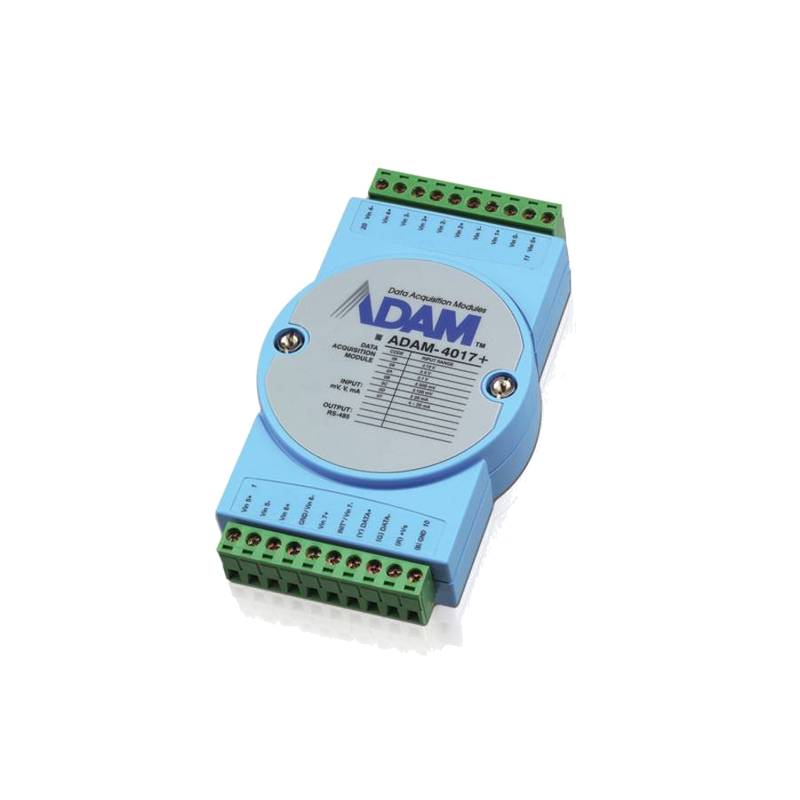
Advantech ADAM-6060-D1 6-Channel Ethernet DI/DO I/O Module


The Advantech ADAM-6060-D1 is a robust 6-channel Ethernet Digital Input/Digital Output (DI/DO) module designed for seamless integration into industrial automation systems. This module offers a cost-effective solution for remote monitoring and control, featuring 6 digital input channels and 6 digital output channels, each configurable for various industrial voltage ranges. Its DIN-rail mountable design and IP30 protection class ensure reliable operation in demanding environments. The ADAM-6060-D1 boasts a wide operating temperature range of -25°C to +70°C, making it suitable for diverse industrial applications. With support for Modbus TCP/IP and Ethernet/IP protocols, it facilitates easy integration with existing SCADA and PLC systems.
Product Specifications
| Feature | Specification |
| :---------------- | :---------------------------------------------------- |
| Digital Inputs | 6 Channels |
| Digital Outputs | 6 Channels |
| Input Voltage | 0-30 VDC, 0-240 VAC |
| Output Voltage | 5-30 VDC, 5-240 VAC |
| Isolation | 2500 VDC |
| Communication | Ethernet (10/100 Mbps) |
| Protocol | Modbus TCP/IP, Ethernet/IP |
| Power Input | 10-30 VDC |
| Operating Temp. | -25°C to +70°C |
| Dimensions | 145 mm x 98 mm x 47 mm |
| Mounting | DIN-rail |
| Protection Class | IP30 |
Core Features & Market Positioning
The Advantech ADAM-6060-D1 distinguishes itself in the competitive industrial IoT market through its exceptional balance of functionality, reliability, and cost-effectiveness. Its dual DI/DO capability in a single unit reduces hardware complexity and installation costs for common automation tasks. The module's support for both Modbus TCP/IP and Ethernet/IP protocols makes it highly versatile, enabling seamless integration into heterogeneous industrial networks, a key differentiator for integrators managing diverse equipment. Advantech's reputation for producing rugged, industrial-grade hardware further solidifies the ADAM-6060-D1's market position as a dependable choice for critical control and monitoring applications. The module's wide input/output voltage flexibility simplifies deployment across various voltage standards prevalent in different industrial sectors.
Key Application Scenarios
The ADAM-6060-D1 finds its niche in a multitude of industrial applications requiring reliable digital signal acquisition and control over Ethernet. It is particularly well-suited for remote monitoring of equipment status, such as detecting the open/closed state of doors, gates, or machinery. Its digital output channels can be leveraged for controlling indicators, alarms, relays, or small actuators, enabling basic automation sequences. Common scenarios include building automation systems for managing lighting and security, industrial plant monitoring for process status indication, and environmental monitoring stations where data from sensors needs to be collected and actions triggered. Its flexibility also makes it ideal for integration into energy management systems, providing on/off control for various devices.
Practical System Integration Guidance
Integrating the Advantech ADAM-6060-D1 into an industrial network is straightforward, primarily leveraging its Modbus TCP/IP or Ethernet/IP capabilities. For Modbus TCP/IP, the module can be assigned a static IP address or configured for DHCP. Device configuration, including input/output channel mapping and voltage settings, is typically performed via Advantech's ADAM Utility software or by direct communication using Modbus read/write commands. Wiring involves connecting the digital input signals to the designated terminals, observing polarity and voltage limits, and connecting the digital outputs to the controlled devices through appropriate relays or drivers. Power is supplied via a 10-30 VDC source to the power terminals, with polarity protection. For Ethernet/IP integration, the module's configuration will align with standard Ethernet/IP device profiles, allowing discovery and mapping within a Rockwell or other compatible PLC environment.
Operation and Risk Mitigation
Operating the ADAM-6060-D1 requires adherence to specified voltage and current limits for both inputs and outputs to prevent damage. Users must ensure that the power supply is within the 10-30 VDC range and that the digital inputs and outputs are not exposed to voltages exceeding their respective maximum ratings (e.g., 30 VDC / 240 VAC). Proper grounding of the module and connected equipment is crucial for electrical safety and noise reduction. In case of communication failures, checking network connectivity, IP address configuration, and firewall settings is recommended. Overload protection on the output channels is not inherent to the module itself and should be implemented externally if the connected loads exceed the output current capabilities. Referencing the user manual for specific error codes or diagnostic LEDs is essential for troubleshooting.
Scalability & Long-Term Value
The ADAM-6060-D1 offers significant scalability and long-term value, particularly within Advantech's broader IIoT ecosystem. Multiple ADAM-6060-D1 modules, along with other ADAM-6000 series devices (e.g., analog I/O, temperature sensors), can be networked together to expand I/O capacity without requiring extensive additional wiring. This distributed I/O architecture simplifies system design and reduces installation costs for larger deployments. Compatibility with standard industrial protocols ensures that the ADAM-6060-D1 can integrate with existing SCADA, HMI, and PLC systems, and can be readily incorporated into future upgrades or migrations to more advanced digital solutions, including cloud-based IIoT platforms. This backward and forward compatibility protects investment and ensures the module remains relevant in evolving industrial automation landscapes.
Frequently Asked Questions
1. What are the primary benefits of using the Advantech ADAM-6060-D1?
The module provides cost-effective remote digital I/O. It integrates 6 DI and 6 DO channels in one unit. This reduces hardware and installation expenses.
It supports Modbus TCP/IP and Ethernet/IP protocols. This ensures broad compatibility with industrial networks. It's easy to integrate into existing SCADA or PLC systems.
The ADAM-6060-D1 is designed for rugged industrial environments. It has a wide operating temperature range. It offers reliable performance even in demanding conditions.
2. How do I connect digital inputs to the ADAM-6060-D1?
Connect your digital input signals to the DI terminals. Ensure the voltage level matches the module's input range (0-30 VDC or 0-240 VAC). Observe proper polarity for DC signals.
Each DI channel can be individually configured for its voltage type via software. This allows flexibility for diverse sensor types. Double-check wiring to prevent short circuits.
For noisy environments, use shielded twisted-pair cables. Ensure all connections are secure. Proper grounding of input devices and the module is essential.
3. Can the ADAM-6060-D1 control high-power devices?
The digital outputs (DO) can switch voltages up to 240 VAC or 30 VDC. However, the current carrying capacity per channel is limited. Consult the datasheet for specific current ratings.
For devices exceeding the output current limit, external relays or contactors are necessary. Use these external devices to switch the higher power loads. The ADAM-6060-D1 will then control these external switching devices.
Always ensure the total load does not exceed the module's overall power handling capabilities. Implementing appropriate overcurrent protection for the loads is highly recommended.
4. What communication protocols does the ADAM-6060-D1 support?
The module primarily supports Modbus TCP/IP protocol. This is a widely adopted standard for industrial communication. It allows easy integration with many PLCs and SCADA systems.
It also features support for Ethernet/IP protocol. This protocol is common in environments using Rockwell Automation products. It enables seamless integration into these specific automation architectures.
These protocols operate over standard 10/100 Mbps Ethernet. Configuration and data exchange are managed via these robust industrial communication standards.
5. How is the ADAM-6060-D1 powered?
The ADAM-6060-D1 requires a DC power supply. The acceptable input voltage range is 10 to 30 VDC. Ensure your power source is within this specification.
Connect the DC power supply to the designated power input terminals on the module. Observe correct polarity when connecting the power supply to avoid damage.
The module also draws power from the Ethernet connection if PoE (Power over Ethernet) is supported and enabled, though it's primarily designed for direct DC power input. Check device-specific documentation for PoE capability.
6. What is the operating temperature range of this module?
The Advantech ADAM-6060-D1 operates reliably within a broad temperature range. It can function from -25°C to +70°C. This wide range makes it suitable for various industrial settings.
This extensive operating temperature capability ensures consistent performance. It is vital for applications in harsh environments like outdoor installations or unconditioned factory floors.
Always ensure adequate ventilation around the module. This prevents heat buildup, especially at the higher end of the operating temperature range.
7. How do I configure the IP address for the ADAM-6060-D1?
You can typically configure the IP address using Advantech's ADAM Utility software. This software allows you to scan the network for connected ADAM devices. You can then assign a static IP address or enable DHCP.
Alternatively, the IP address can be set through Modbus TCP commands. This method is useful for automated configuration or when the utility software is not readily available. Consult the manual for specific Modbus register addresses.
For Ethernet/IP, IP address configuration usually follows the requirements of the specific Ethernet/IP scanner or controller. It might involve uploading a device description file (EDS).
8. What are the physical dimensions and mounting options?
The ADAM-6060-D1 has compact dimensions, measuring 145 mm x 98 mm x 47 mm. This small footprint aids in space-constrained control panels.
It is designed for easy DIN-rail mounting. This is a standard mounting method in industrial electrical enclosures. This facilitates quick and secure installation.
The module's robust enclosure also offers IP30 protection. This means it's protected against solid objects larger than 2.5mm, but not against water ingress.
9. Is the ADAM-6060-D1 suitable for hazardous environments?
The ADAM-6060-D1 is rated for industrial environments with its IP30 protection. However, it is not intrinsically safe or explosion-proof. Therefore, it is not suitable for hazardous locations.
Hazardous areas require specialized equipment certified for such conditions. Always consult safety regulations and choose appropriately certified devices for explosive or flammable atmospheres.
For standard industrial settings without specific hazardous area classifications, the module provides robust performance. Its wide operating temperature range is a key advantage.
10. How can I troubleshoot communication issues with the ADAM-6060-D1?
First, verify physical network connections and cable integrity. Ensure the Ethernet port on the module is properly connected to the network switch. Check the link lights on the Ethernet port.
Confirm the IP address settings are correct and that there are no IP conflicts on the network. Verify that any firewalls or network security devices are not blocking communication ports used by Modbus TCP/IP or Ethernet/IP.
If using Modbus TCP/IP, use a Modbus testing tool to send a PING or a simple read command to verify responsiveness. For Ethernet/IP, check the status of the module within the PLC's I/O tree.