











WEINVIEW TK6072iP HMI Panel 7 Inch Budget Model


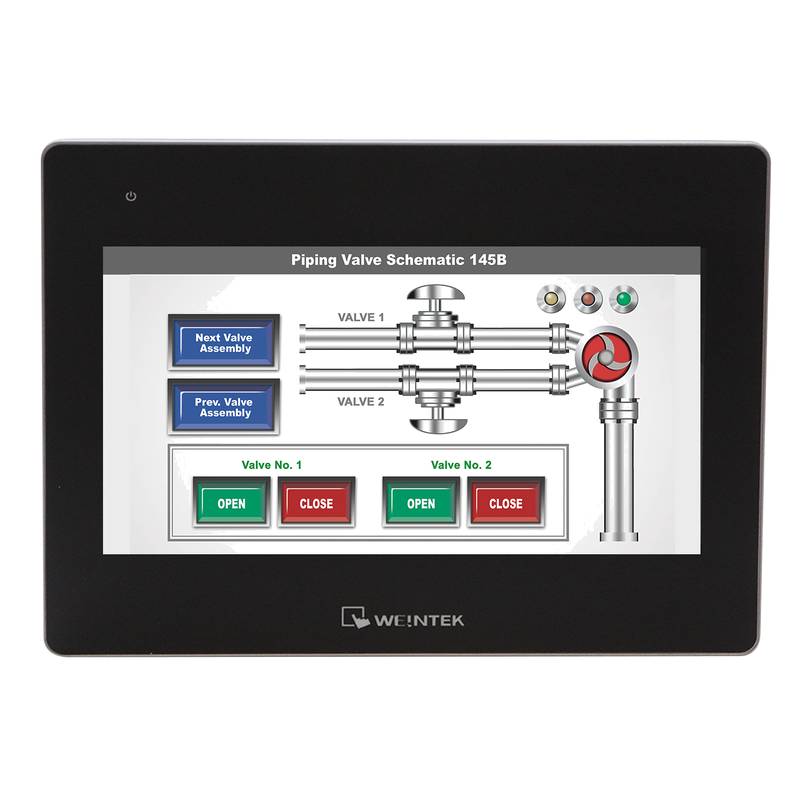
The WEINVIEW TK6072iP HMI panel is a compelling 7-inch budget-friendly solution designed for industrial automation, offering a blend of essential functionality and cost-effectiveness for a wide range of applications. This model distinguishes itself with its vibrant 7-inch TFT LCD display, supporting a resolution of 800x480 pixels, and an intuitive touchscreen interface. Key technical specifications include a powerful 32-bit ARM9 processor, 128MB of flash memory, and 64MB of RAM, ensuring smooth operation and efficient data handling. The panel features a robust IP65 front panel protection rating, making it suitable for harsh industrial environments, and operates within a wide temperature range of 0 to 50 degrees Celsius. Connectivity is facilitated through a standard RS232/RS485/RS422 serial port and an Ethernet port, enabling seamless integration with various PLCs and industrial control systems.
Product Specifications
| Feature | Specification |
| :------------------ | :--------------------------------------------- |
| Display Size | 7-inch TFT LCD |
| Resolution | 800 x 480 pixels |
| Touchscreen Type | Resistive |
| Processor | 32-bit ARM9 |
| Memory (Flash) | 128MB |
| Memory (RAM) | 64MB |
| Communication Ports | 1 x RS232/RS485/RS422, 1 x Ethernet |
| Front Panel Protection | IP65 |
| Operating Temperature | 0°C to 50°C |
| Power Supply | 24VDC ±10% |
| Dimensions (W x H x D) | 195mm x 142mm x 33mm |
| Cutout Size (W x H) | 181mm x 130mm |
Core Features & Market Positioning
The WEINVIEW TK6072iP positions itself as a high-value, entry-level Human-Machine Interface (HMI) panel, ideal for small to medium-sized automation projects where budget is a primary consideration. Its competitive advantage lies in offering a reliable and functional 7-inch touchscreen interface without the premium price tag often associated with larger or more feature-rich HMI units. The inclusion of standard communication protocols like RS485 and Ethernet ensures broad compatibility with a vast array of PLCs from leading manufacturers, making it a versatile choice for system integrators. The robust IP65 front panel rating is a critical differentiator in its class, providing assurance against dust ingress and low-pressure water jets, common challenges in industrial settings. This durability, combined with its user-friendly interface and accessible price point, makes the TK6072iP an attractive option for cost-conscious automation solutions.
Key Application Scenarios
The WEINVIEW TK6072iP HMI panel is exceptionally well-suited for a variety of industrial applications where straightforward operator control and monitoring are paramount. It finds extensive use in machine control, providing operators with a clear interface to start, stop, and adjust machine parameters. In the packaging machinery, it allows for easy setting of product dimensions, speeds, and other critical operational data. For small-scale process control systems, such as those in water treatment plants or food and beverage production lines, the TK6072iP offers vital visualization of tank levels, flow rates, and temperature readings, enabling operators to make informed adjustments. Its budget-friendly nature also makes it an ideal candidate for retrofitting older equipment, upgrading basic control panels to a modern, touch-enabled interface without significant investment.
Practical System Integration Guidance
Integrating the WEINVIEW TK6072iP into an industrial control system is a streamlined process, facilitated by its standard communication interfaces and user-friendly configuration software. Wiring for the 24VDC power supply is straightforward; connect the positive (+) terminal to the DC input and the negative (-) terminal to the DC common. For communication, utilize either the RS232, RS485, or RS422 port based on your PLC's requirements, ensuring correct wiring of data lines (TX, RX, GND for RS232; D+, D-, GND for RS485; TXD, RXD, GND, RTS, CTS for RS422). The Ethernet port simplifies network integration, typically requiring a standard CAT5e or CAT6 cable connected to your industrial network switch or directly to a PLC with Ethernet capabilities. Configuration is performed using WEINVIEW's EasyBuilder Pro software, which allows for drag-and-drop design of screens, selection of PLC drivers, and mapping of HMI elements to PLC data registers. Creating a project involves selecting the correct PLC model within the software, defining the communication parameters (baud rate, parity, IP address), and then populating the screens with buttons, indicators, and data displays.
Operation and Risk Mitigation
Operating the WEINVIEW TK6072iP HMI panel is designed to be intuitive, minimizing the learning curve for operators. The resistive touchscreen responds to light pressure, and on-screen elements are clearly defined for easy interaction. Critical to risk mitigation is understanding the panel's limitations and ensuring proper setup. Always verify that the PLC communication is stable and that data is being exchanged correctly before relying on the HMI for critical operations. Incorrect wiring or communication configuration can lead to erroneous data display, potentially causing operational errors. While the TK6072iP offers IP65 front protection, it is not designed for complete immersion in water or exposure to high-pressure jets; ensure the panel is installed in an environment appropriate for its rating. Regular visual inspection for any physical damage to the screen or casing is recommended to preempt potential failures. Familiarize yourself with the alarm management features within EasyBuilder Pro to ensure any critical process deviations are promptly flagged to the operator.
Scalability & Long-Term Value
The WEINVIEW TK6072iP provides a solid foundation for small to medium automation projects, offering a degree of scalability through its broad PLC compatibility and standard communication protocols. While the panel itself may not have direct upgrade paths for internal hardware, its value is extended by its ability to interface with a wide range of modern PLCs, allowing for system expansion by adding more intelligent controllers. Its standard Ethernet connectivity also opens avenues for integration into supervisory control and data acquisition (SCADA) systems, enabling remote monitoring and data logging capabilities, which are fundamental to the Industrial Internet of Things (IIoT) paradigm. By leveraging common industrial communication standards, the TK6072iP ensures that as a facility upgrades its PLC infrastructure, the HMI can likely remain a functional part of the control architecture, preserving the initial investment and minimizing the need for complete HMI replacement.
Frequently Asked Questions (FAQs)
What PLCs are compatible with the WEINVIEW TK6072iP?
The TK6072iP supports a vast array of PLC brands. Its EasyBuilder Pro software includes drivers for major manufacturers like Siemens, Allen-Bradley, Mitsubishi, Omron, and Delta.
This broad compatibility ensures it can integrate into existing or new automation setups seamlessly. Always confirm driver availability in EasyBuilder Pro for your specific PLC model.
How do I program the WEINVIEW TK6072iP HMI?
Programming is done using the free EasyBuilder Pro software. You select your PLC driver, configure communication settings (like COM port or IP address), and then design your HMI screens using a drag-and-drop interface.
You create buttons, data displays, and alarms, then map them to the corresponding data addresses in your PLC. Finally, you download the project to the HMI via USB or Ethernet.
What is the warranty period for the WEINVIEW TK6072iP?
WEINVIEW typically offers a standard warranty on their HMI panels, usually around one year from the date of purchase. It's crucial to check with your specific distributor or supplier for exact warranty terms and conditions.
This warranty generally covers manufacturing defects but excludes damage due to misuse, improper installation, or environmental factors beyond the panel's specifications.
Can the WEINVIEW TK6072iP connect to a network for remote monitoring?
Yes, the TK6072iP features an Ethernet port, enabling network connectivity. This allows for integration into SCADA systems or other networked solutions for remote monitoring.
With appropriate network infrastructure and software configuration, operators can view HMI screens and data from remote locations. This is a key aspect for IIoT integration and enhanced operational oversight.
What is the power consumption of the WEINVIEW TK6072iP?
The WEINVIEW TK6072iP typically consumes around 15W of power. It requires a 24VDC power supply, which is standard in most industrial automation environments.
It is essential to ensure your power supply can adequately handle the HMI's consumption along with other control components. Refer to the official datasheet for precise power specifications.
How do I perform a factory reset on the WEINVIEW TK6072iP?
A factory reset can usually be initiated through the HMI's system menu or by holding specific buttons during power-up. Consult the user manual for the exact procedure for your model.
A factory reset will revert all settings and user programs to their default state, effectively erasing any configuration you have loaded. Always back up your project before performing a reset.
Is the WEINVIEW TK6072iP suitable for outdoor applications?
The TK6072iP has an IP65 front panel rating, which means it is protected against dust and low-pressure water jets. However, it is not designed for direct outdoor exposure to sunlight, extreme temperatures, or heavy rain.
For outdoor use, consider installing it within a suitable enclosure that provides additional protection against environmental factors. Always adhere to the specified operating temperature range.
What kind of touchscreen technology does the WEINVIEW TK6072iP use?
The WEINVIEW TK6072iP utilizes a resistive touchscreen. This technology is known for its durability and ability to be operated with gloved hands, which is a significant advantage in industrial settings.
Resistive touchscreens are activated by physical pressure, making them less susceptible to false triggers from water droplets or dust compared to capacitive screens.
How do I update the firmware on the WEINVIEW TK6072iP?
Firmware updates are typically performed via a USB drive or through the EasyBuilder Pro software. Specific instructions and firmware files can usually be downloaded from the WEINVIEW website or obtained from their support channels.
Ensure you follow the update procedure precisely to avoid corrupting the HMI's operating system. A firmware update can sometimes resolve bugs or add new features.
What is the typical screen refresh rate of the WEINVIEW TK6072iP?
The screen refresh rate is not a commonly advertised specification for budget HMI panels like the TK6072iP, but it is generally sufficient for typical industrial monitoring and control tasks. The display is designed for clear visualization of changing data and status.
For applications requiring extremely high-speed graphical updates or real-time video, a more specialized or higher-end HMI would be necessary. The TK6072iP excels at its intended purpose of operator interface.